
SEO Lands Smart Chat – Free AI Chatbot for WordPress
An AI chatbot that answers from your own website
SEO Lands Smart Chat reads your pages, posts, products and courses and answers visitor questions in English, Hindi or Hinglish. Turn more visitors into leads with live chat, email alerts and enquiry forms, all from your WordPress dashboard.
100% free plugin. Works without an API key; add Google Gemini or Grok for smarter answers.
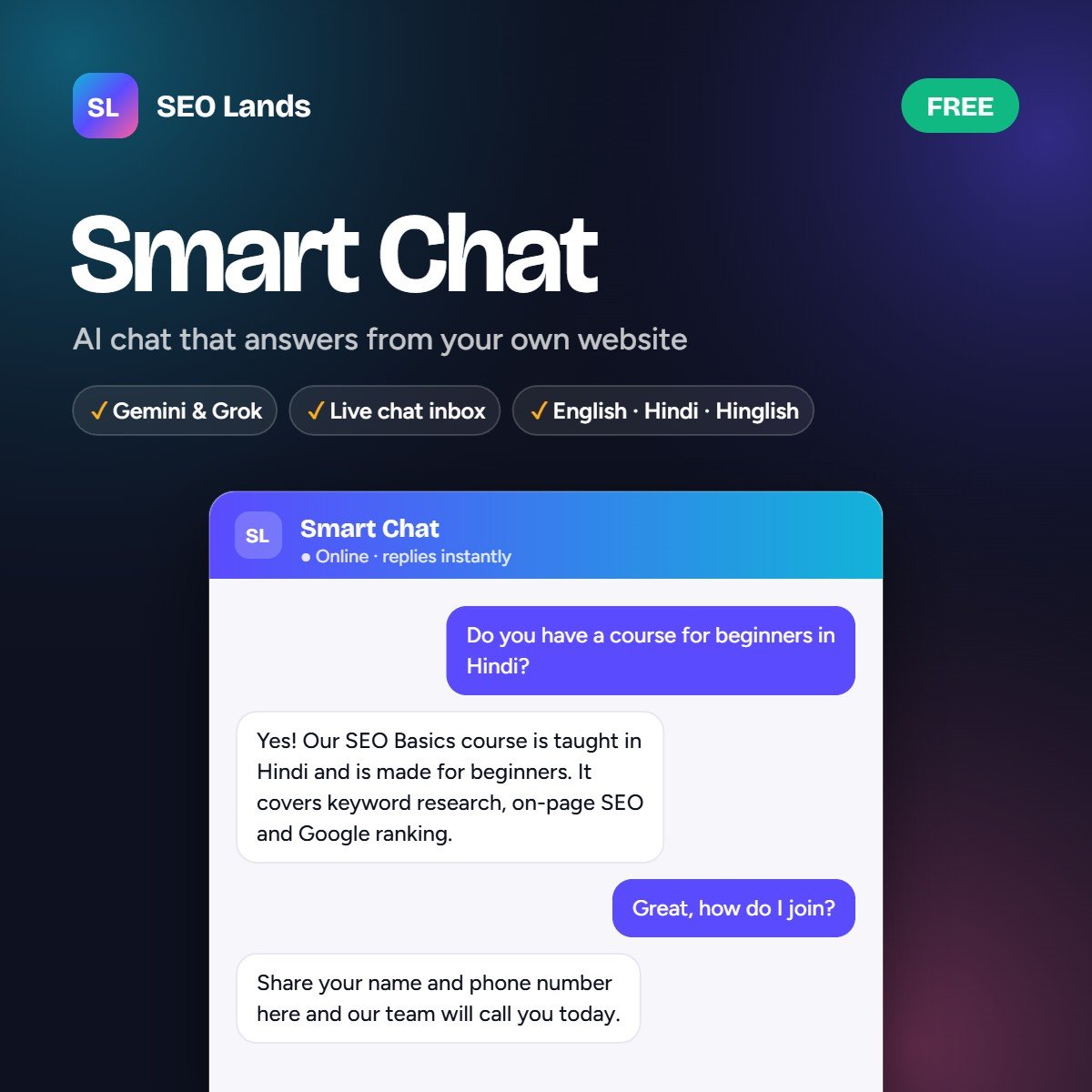
A website chatbot trained on your own content
Generic AI chatbots guess. Smart Chat looks up your pages, products, courses and services first, then answers with facts from your site and links to the right page.
- Online stores: shows product cards with price, rating and Add to cart.
- Services, courses and businesses: answers like a helpful advisor, no product cards.
- Your rules: custom instructions, blocked topics and a clear price policy.
- Never misses a lead: collects name, phone and email into your form or CRM.
Everything you need in a WordPress AI chatbot
Answer questions, capture leads and talk to visitors live, without a monthly chatbot subscription.
Answers from your content
Reads pages, posts, products, courses and any custom post type to give accurate answers.
English, Hindi and Hinglish
Replies naturally in the language your visitors use, perfect for Indian websites.
Gemini and Grok AI
Google Gemini or Grok (Groq keys work too) with automatic backup and model choice.
WooCommerce product cards
On shops it shows products with price, rating and an Add to cart button.
Live chat inbox
Take over any conversation, reply as your team and see who is online right now.
Lead capture and CRM
Sends enquiries into Elementor Pro, Contact Form 7, Gravity Forms and more, or to any CRM by webhook.
Answer rules
Your own instructions, topics it must not answer, and a fees and prices policy.
Fast, SEO aware, no cookies
Cache friendly, mobile friendly, and it never reads noindex, landing or thank-you pages.
Smart Chat in 45 seconds
A quick tour of what the chatbot does for your website.
Smart Chat
A free AI chatbot for WordPress that answers from your own website.
It looks up your site first, then answers with facts.
With a link to the right page.
Price, rating and Add to cart, right in the chat.
Reply as your team and see who is online.
Works without an API key. Add one for smarter answers.
Never miss a lead.
Free on WordPress.org. No monthly chatbot fee.
tools.seolands.com
Add an AI chatbot to WordPress in four steps
No coding needed. Most sites are live in a few minutes.
Install the plugin
Search “SEO Lands Smart Chat” in Plugins → Add New, or download it from WordPress.org.
Choose your website type
Online store, services and courses, or both. Or leave it on Auto-detect.
Add an AI key (optional)
Save a Google Gemini or Grok key for smarter answers, and set your answer rules.
Go live
The chat appears on your site. Reply live from the inbox and collect leads.
Built for every kind of WordPress website
Online stores
Help shoppers find the right product and add it to cart from the chat.
Coaching and education
Answer course, batch and admission questions in Hindi or English, day and night.
Service businesses
Explain your services and turn questions into enquiries for your team.
Agencies
Add a smart chatbot to client sites with no monthly fees.
Works with the plugins you already use
Form plugins
SEO plugins
Store and cache
Smart Chat vs a basic chat widget
| Basic chat widget | SEO Lands Smart Chat | |
|---|---|---|
| Answers | Canned replies or generic AI | Answers from your own pages and products |
| Languages | Mostly English | English, Hindi and Hinglish |
| When you are offline | Visitor waits or leaves | AI answers and collects the lead |
| Leads | Stored in another dashboard | Sent into your own form or CRM |
| Prices | No control | Show prices or always share contact details |
| Cost | Monthly subscription | Free plugin; pay only your AI provider if you use a key |
SEO Lands Smart Chat: frequently asked questions
What is SEO Lands Smart Chat?
It is a free AI chatbot plugin for WordPress. It reads your pages, posts, products and courses and answers visitor questions in English, Hindi or Hinglish, with live chat and lead capture built in.
Is SEO Lands Smart Chat free?
Yes. The plugin is free to download from WordPress.org. If you add a Google Gemini or Grok API key, the AI provider bills you directly for usage.
Do I need an API key?
No, but answers are much better with one. Without a key it still answers from your pages with a built-in search engine.
Does it work on a site without WooCommerce or courses?
Yes. On a shop it talks about products and shows product cards, on an education site about courses, and on any other site about your services. Set it under General → Website type, or leave it on Auto-detect.
The assistant told a wrong price. How do I stop that?
Go to Smart Chat → Settings → Answer Rules → Price questions and choose “Never show prices – share contact details”. If you prefer to show prices, add the exact prices in Knowledge → Extra information as Q: / A: lines.
Can I reply to visitors myself?
Yes. The live chat inbox lets you take over any conversation, reply as your team and see who is online.
Can I stop email alerts?
Yes. Use the “When I am offline” switch under Live Chat & Alerts. Enquiry form leads are controlled separately in Leads & CRM.
Which form plugins can receive leads?
Elementor Pro, Contact Form 7, Gravity Forms, and any form plugin with a shortcode such as WPForms, Fluent Forms, Ninja Forms, Formidable and Forminator. An optional webhook sends leads to any CRM.
Does it slow down my site or use cookies?
It is built to be cache friendly with LiteSpeed, WP Rocket and similar plugins, is mobile friendly and uses no cookies.
Add a smart AI chatbot to your WordPress site
Free on WordPress.org. Answer visitors in their language and never miss a lead again.